Realign the plate, clean the rollers, or replace the turntable motor.
A stuck microwave tray can ruin dinner fast. In this friendly, expert guide on How to Fix Microwave Turntable Not Spinning, I walk you through quick checks, safe repairs, and smart tips that actually work. I have fixed many turntable issues at home and in workshops, and I keep the steps simple and safe. If you want to know How to Fix Microwave Turntable Not Spinning without guesswork, you are in the right place.
What Makes a Microwave Turntable Spin
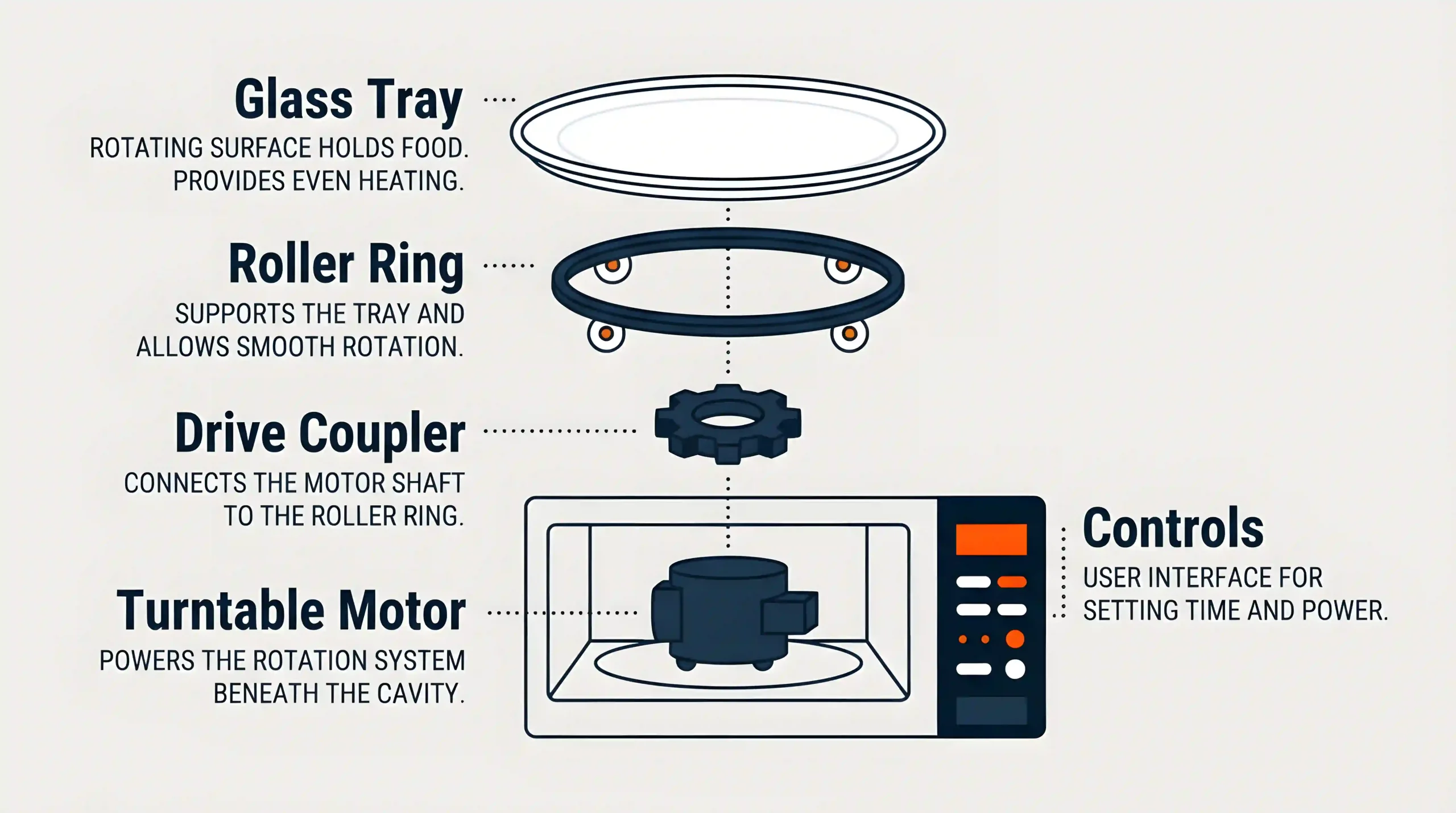
A turntable is a small system with a few key parts. When you know each one, you can spot the fault fast.
- Glass tray. The round plate that holds food. It sits on the roller ring and the center coupler.
- Roller ring. A plastic ring with small wheels. It lets the plate glide with little friction.
- Drive coupler. A small plastic hub that fits into the center of the plate. It grips the motor shaft.
- Turntable motor. A slow AC synchronous motor under the oven floor. It turns about 5 to 6 RPM.
- Controls. The control board and a relay send power to the motor. Some models have a Turntable On or Off button.
Most problems come from dirt, misalignment, or a worn coupler or motor. This is the base of How to Fix Microwave Turntable Not Spinning.
Safety First: Read This Before You Open Anything
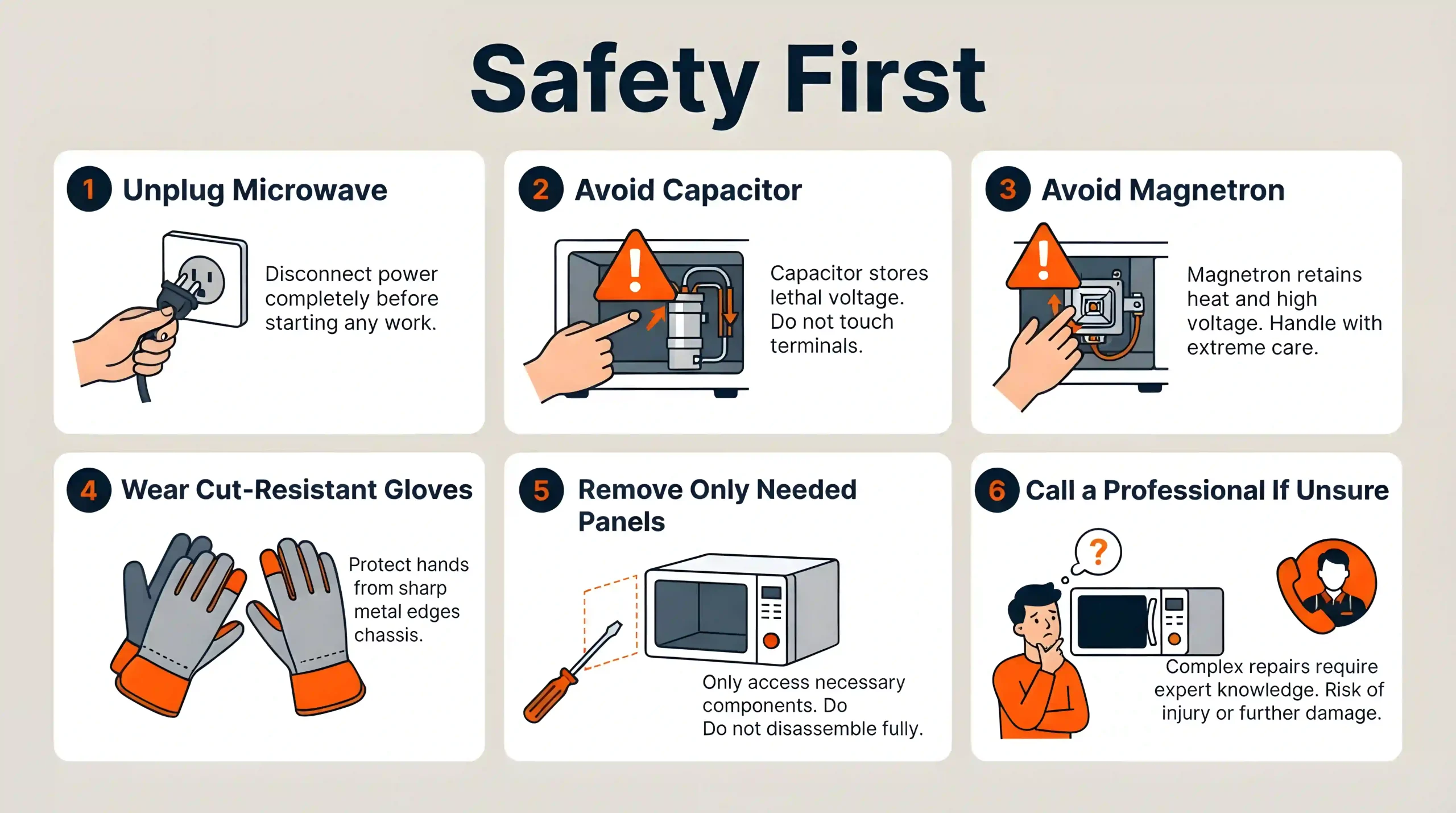
Microwaves can store high voltage even when unplugged. The high voltage parts are deadly if you touch them. The good news is the turntable system is separate and low risk if you unplug first and stay away from the high voltage area.
Follow these rules.
- Unplug the microwave from the wall. Do not just open the door.
- Do not touch the capacitor, magnetron, or any high voltage wiring.
- Only remove panels needed to reach the turntable motor or coupler.
- Wear cut‑resistant gloves. Metal edges can be sharp.
- If you are unsure, stop and call a pro. Safety beats speed.
From years of repairs, I learned one hard lesson. Rushing causes cuts and broken tabs. Slow is smooth. Smooth is fast. Safe habits are part of How to Fix Microwave Turntable Not Spinning the right way.
Quick Checks You Can Do in 2 Minutes
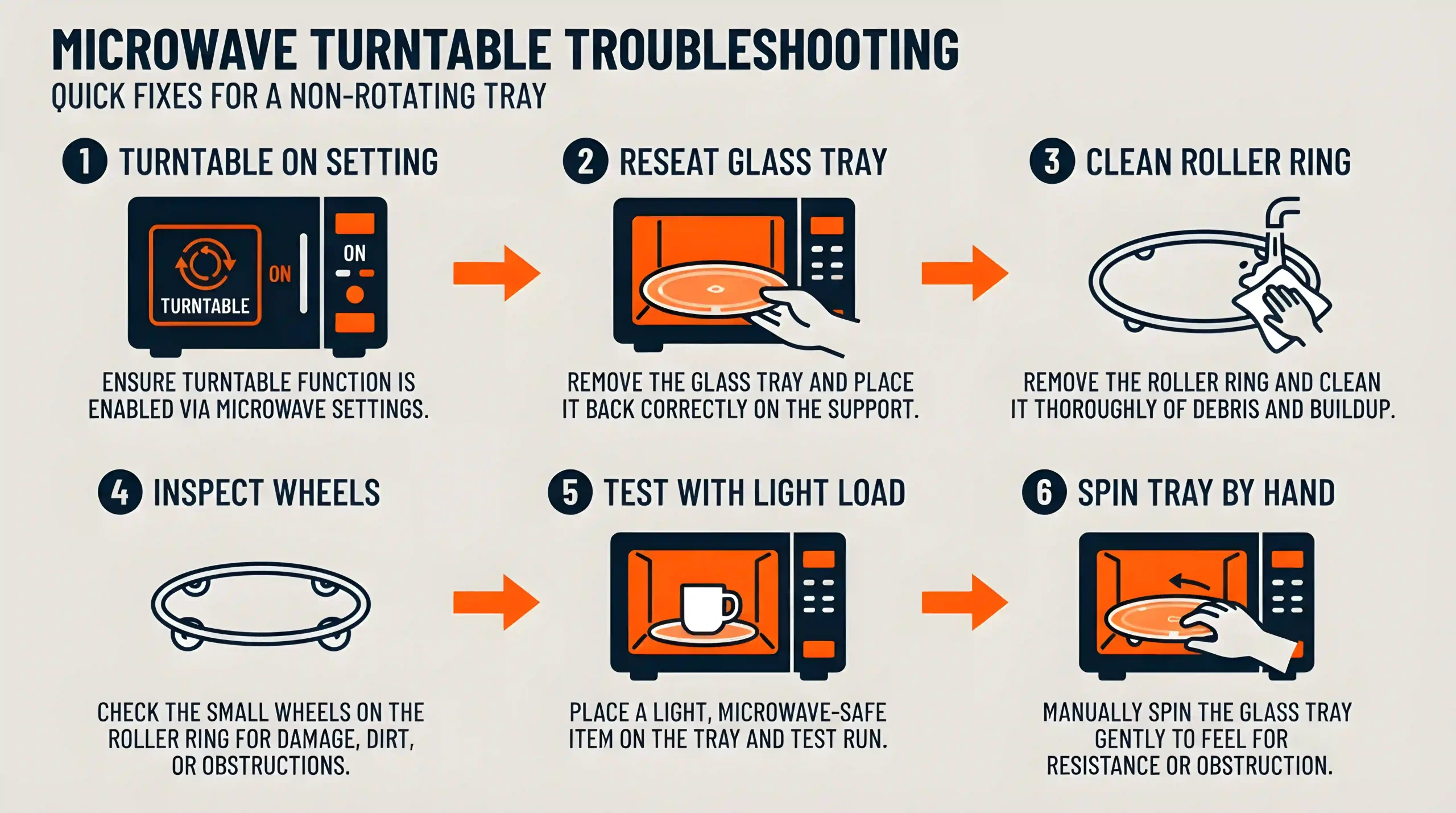
Try these simple checks before you grab tools.
- Make sure Turntable On or Off is set to On. Some models have a button or a menu setting.
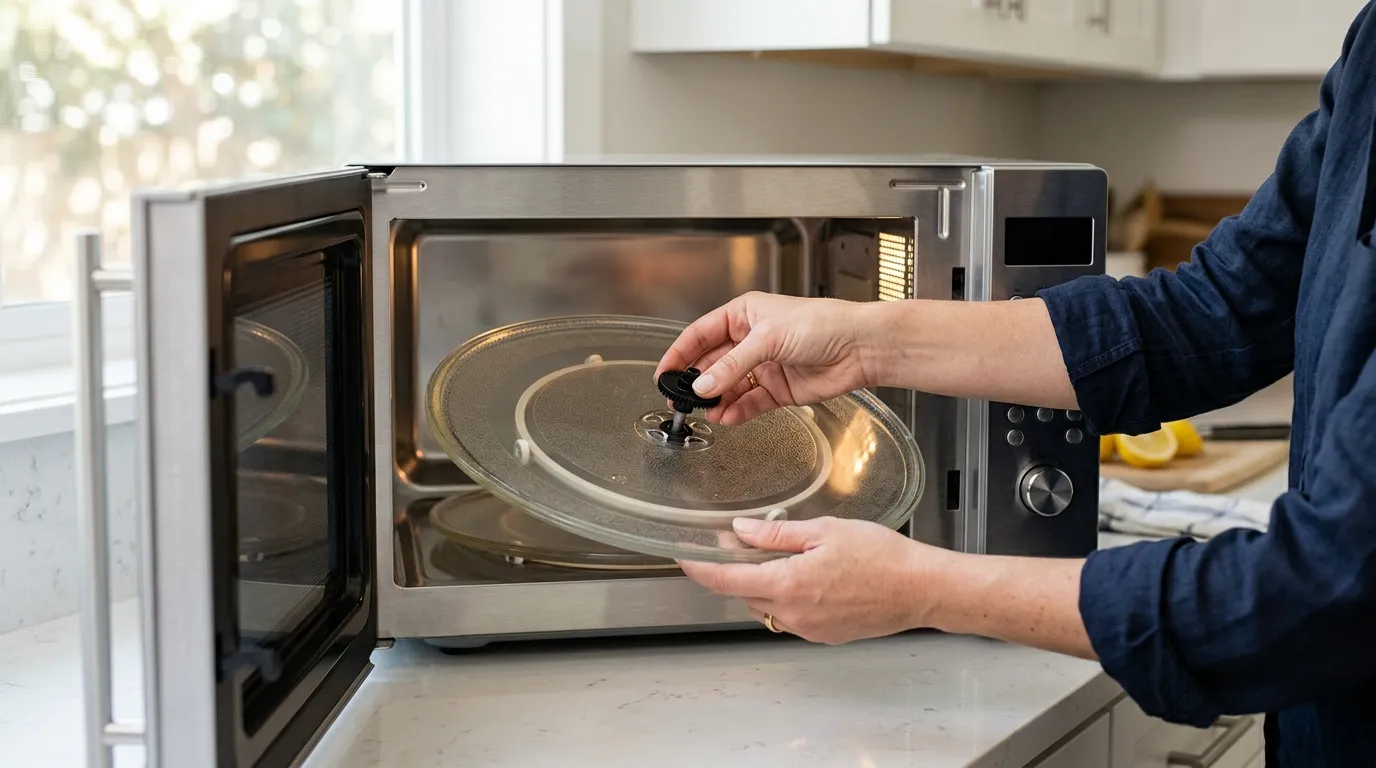
- Lift the glass tray. Reseat it so the center slots lock onto the coupler.
- Remove the roller ring. Clean it and the oven floor. Dried sauce can jam the wheels.
- Check the roller ring wheels. If a wheel is flat, cracked, or missing, replace the ring.
- Try a light load. Heavy dishes can stall the motor. Use a lighter, flat bottom bowl.
- Spin the tray by hand. It should move smooth and free with slight drag. If it scrapes, clean and reseat the parts.
- Check for tall or wide cookware that hits the walls.
If one of these solves it, you already did the core of How to Fix Microwave Turntable Not Spinning.
Step-by-Step: How to Fix Microwave Turntable Not Spinning
Work in order, from easy to advanced. Unplug the microwave before any part removal.
The Turntable Setting Is Off
Many models let you turn the carousel off for big dishes.
- Look for a Turntable button. Press to toggle On.
- If your model uses menus, check the options. Some show an icon of a plate.
This small step often fixes half the cases I see.
Misaligned or Dirty Glass Tray and Roller Ring
Grease and crumbs can glue the parts in place.
- Remove the tray and roller ring. Wash both with warm soapy water. Rinse and dry.
- Wipe the oven floor clean. Remove sticky spots and crumbs.
- Reseat the ring in its groove. Set the tray so its center fits on the coupler.
- Do not use oil or grease. Clean and dry works best.
Worn or Cracked Drive Coupler
The coupler is a cheap plastic part. It can split at the shaft or wear smooth.
- Lift the tray and ring. Pull the coupler straight up to remove it.
- Inspect the splines and the center hole. Look for cracks or melted spots.
- Replace with the exact part number from your manual. Universal couplers fit many models.
- Press the new coupler onto the shaft by hand. Do not hammer it.
A fresh coupler often brings the spin back in minutes.
Failed Turntable Motor
If the motor hums or stalls, it may be weak or open. This is the most common part failure.
Signs and tests.
- The tray stops under load but moves by hand. The motor likely lost torque.
- You hear a faint hum but no motion. The motor may be seized.
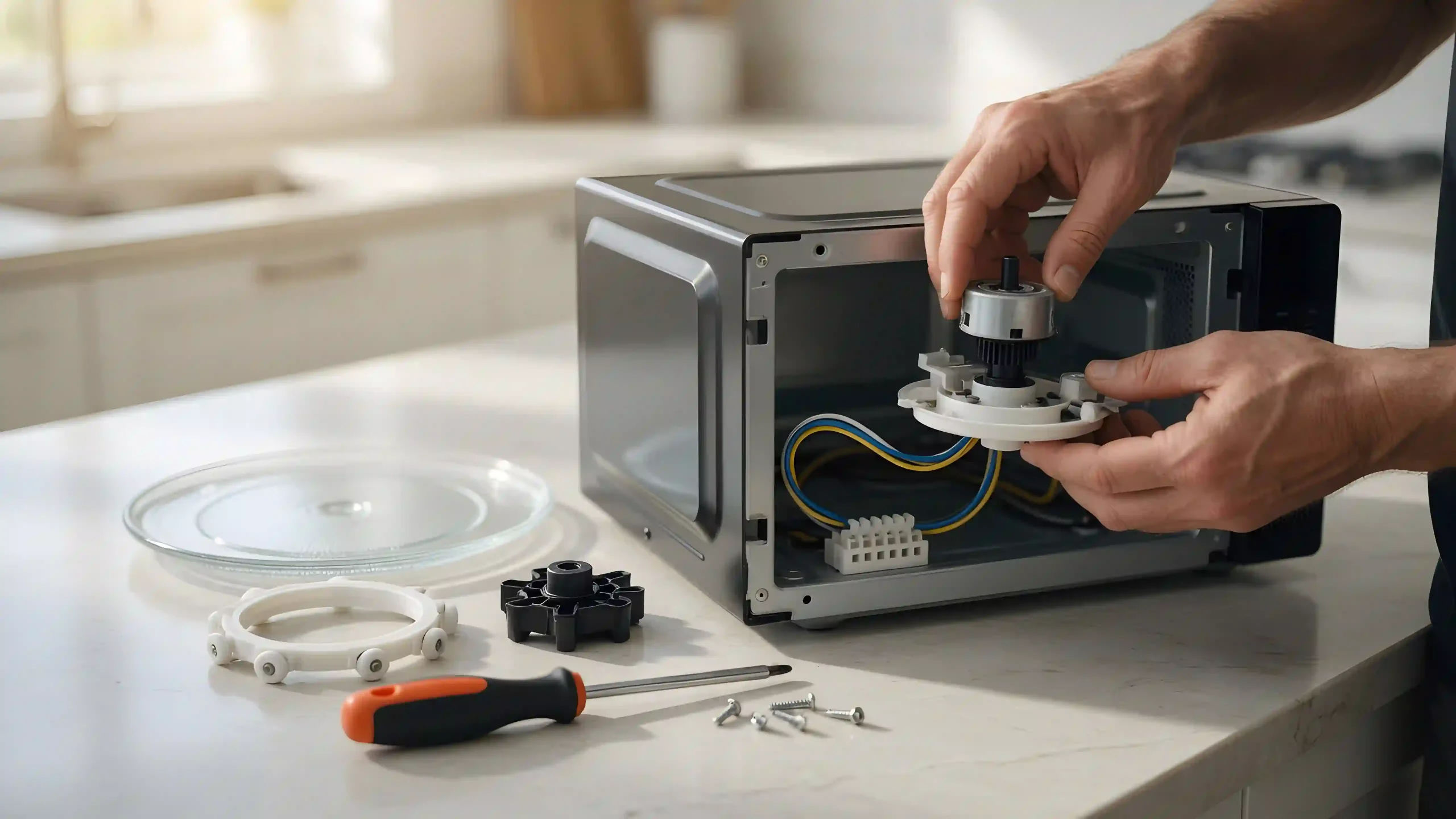
- With the unit unplugged, remove the bottom panel or rear screws to access the motor. It sits under the center.
- Check the motor label for voltage. Common ratings are 21V AC, 24V AC, or 120V AC, 4 to 6 RPM. Match the specs when you buy a new one.
- If you have a multimeter, test for coil continuity across the motor leads. An open reading means a bad motor.
Replace the motor.
- Unplug the unit. Remove the turntable motor screws from below.
- Swap the motor. Transfer the rubber grommet if present.
- Reinstall screws. Do not pinch wires. Reseat the coupler, ring, and tray.
This step is central to How to Fix Microwave Turntable Not Spinning.
Stuck Turntable Support or Center Bushing
Food can harden under the coupler and act like glue.
- Clean the hub area with warm water and a cloth.
- Use a plastic scraper for stubborn spots. Do not use oil or spray lube.
- Reseat the parts and test.
Door Switch or Control Board Issues
These are rare for a no-spin only issue.
- If the oven heats but never spins, and motor and coupler are good, the motor control relay or wiring may be bad.
- If the oven will not run at all, a door switch may be the cause.
- At this point, call a qualified tech. Board work needs advanced skills and safety steps.
How to Fix Microwave Turntable Not Spinning is often simple. Still, know when to stop and get help.
Cost, Parts, and Time Estimates
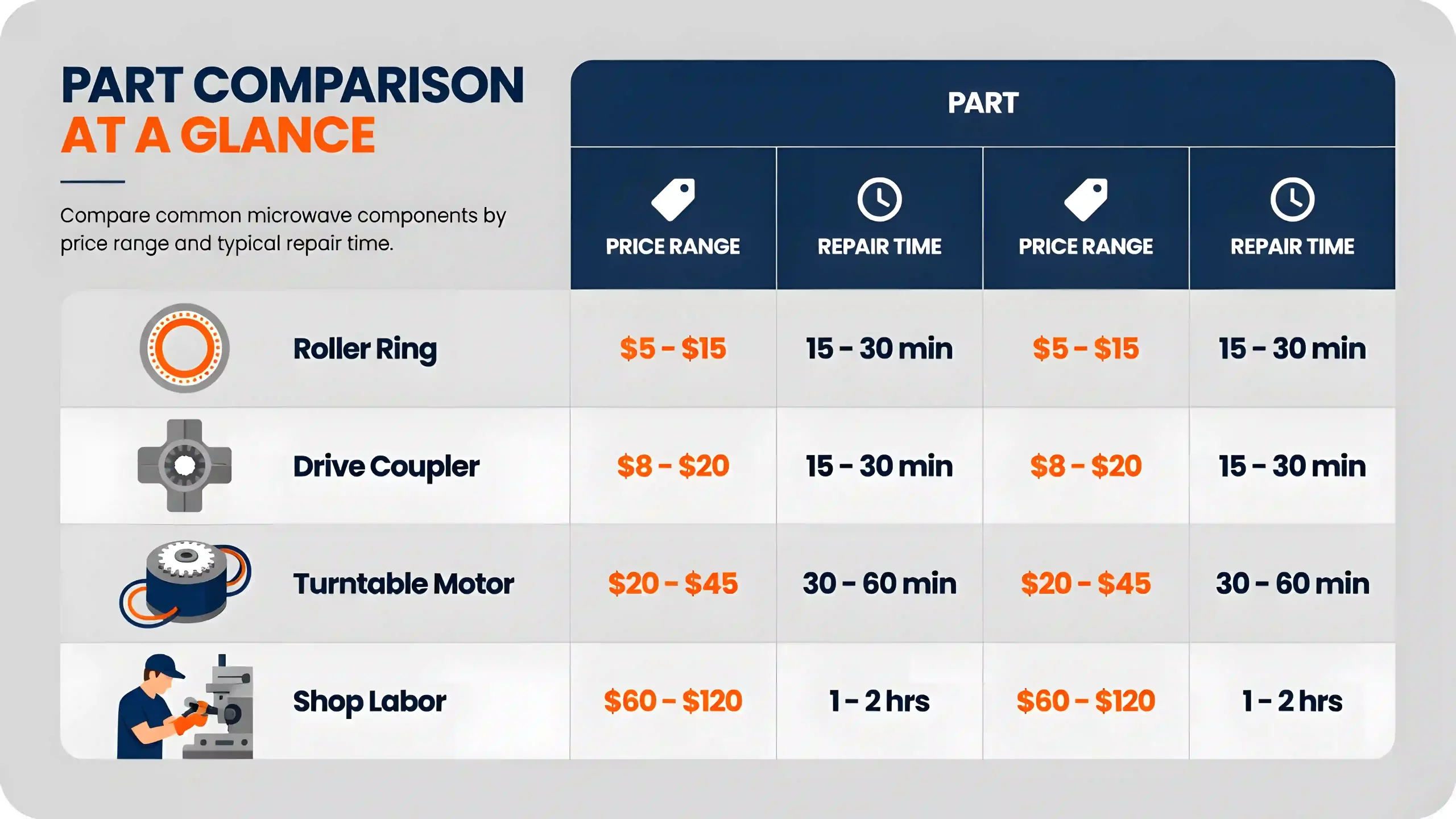
Here is what I see in real repairs.
- Roller ring. 10 to 25 dollars. 2 to 5 minutes to swap.
- Drive coupler. 5 to 15 dollars. 2 to 5 minutes to swap.
- Turntable motor. 12 to 40 dollars. 10 to 30 minutes to replace.
- Labor at a shop. 70 to 150 dollars plus parts, depending on your area.
If your oven is older and needs a motor and ring, weigh the cost. A DIY motor swap is often worth it. This helps you judge How to Fix Microwave Turntable Not Spinning without overspending.
Preventive Care to Keep It Spinning Smooth
Small habits keep the tray happy.
- Wipe spills after each use. Dried sugar is like glue on wheels.
- Keep loads light and even. Spread food flat on the plate.
- Use flat bottom, microwave safe dishes. Avoid ridged or warped bases.
- Check the roller ring monthly. Replace at the first crack.
- Make sure the oven is level. Uneven feet add drag and noise.
- Use the Turntable Off mode only for large pans. Turn it back on after.
Do these and you may never search How to Fix Microwave Turntable Not Spinning again.
Real-Life Fixes: What I Learned After 50+ Turntable Repairs
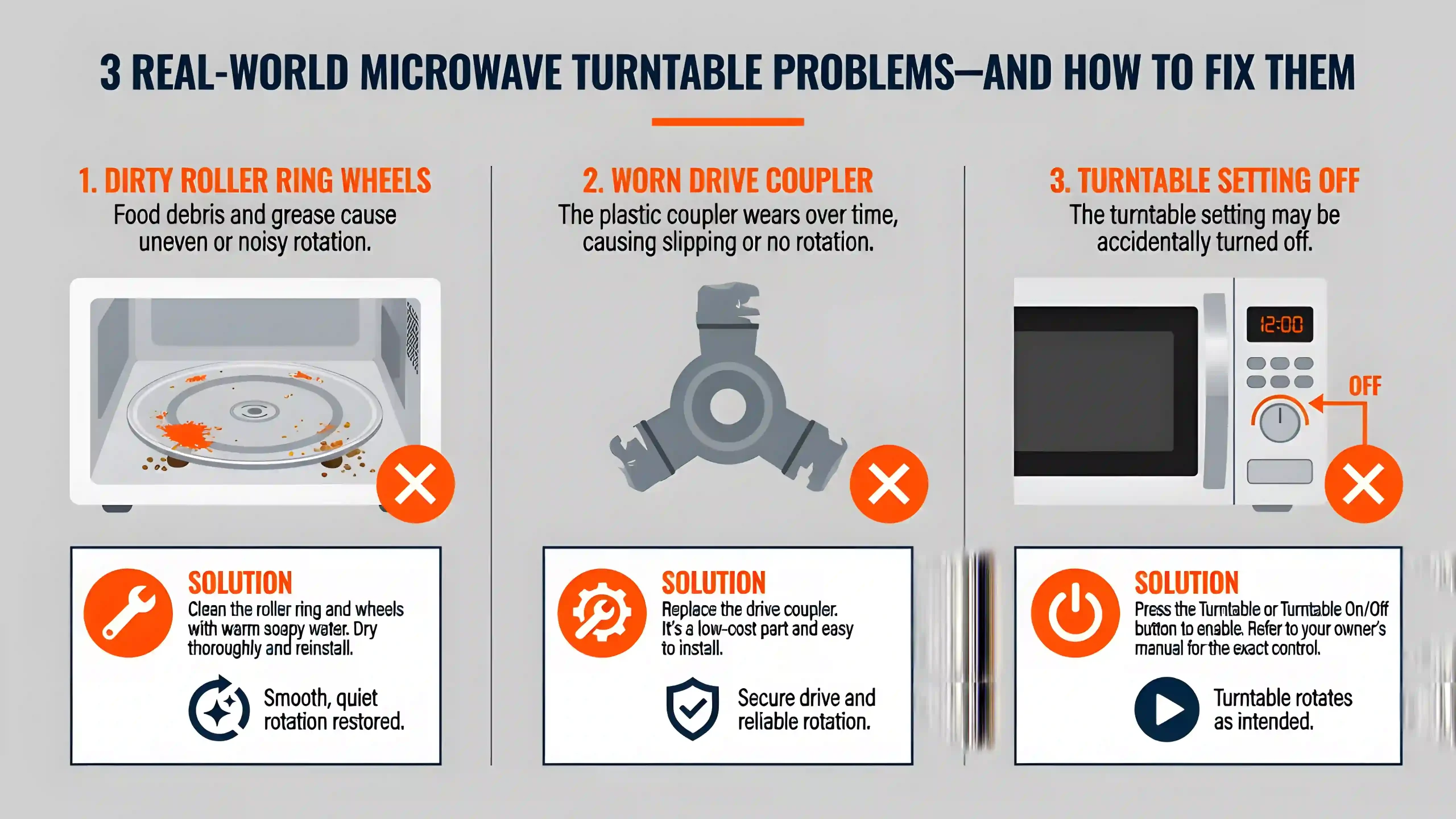
A few stories can save you time.
- The sauce trap. A client’s tray would jerk, then stop. The roller ring looked fine, but the wheels were packed with dried marinara. A five minute wash fixed it. No parts needed.
- The mystery meltdown. A family kept seating the tray off center. The coupler wore uneven and melted at the hub. A 10 dollar coupler and a quick lesson ended the cycle.
- The hidden setting. A busy café had the turntable off in the settings. They did not know the option existed. One button press and they were back in business.
The big lesson in How to Fix Microwave Turntable Not Spinning is simple. Clean first. Align next. Replace cheap parts before chasing complex faults.
Frequently Asked Questions of How to Fix Microwave Turntable Not Spinning
Why did my microwave turntable stop spinning but the oven still heats?
The motor, coupler, or roller ring may be worn or dirty. Start with cleaning and reseating, then test the motor.
Can I oil the roller ring or coupler to make it smoother?
Do not use oil. It attracts dust and food. Clean with warm soapy water and dry well.
What tools do I need for How to Fix Microwave Turntable Not Spinning?
You need a screwdriver, a towel, and maybe a multimeter. Gloves help with sharp edges when you access the motor.
Is it safe to replace the turntable motor myself?
Yes, if you unplug the microwave and only access the motor area. Do not touch the high voltage parts inside the cavity.
How do I know if my motor is the right replacement?
Match the voltage and RPM on the motor label and your model number. If in doubt, check the user manual or a parts lookup.
Is it worth learning How to Fix Microwave Turntable Not Spinning or should I call a pro?
If cleaning or a coupler swap fixes it, DIY is fast and cheap. For control board or wiring faults, call a technician.
Why does my plate wobble or scrape the floor?
The roller ring may be out of its groove, or the tray is not seated on the coupler. Reseat both and check for cracks.
Conclusion
A microwave tray that will not spin is often an easy fix. Clean the ring and tray, seat the coupler, and replace the motor if needed. You now know How to Fix Microwave Turntable Not Spinning with clear steps, safe habits, and smart checks.
Take ten minutes today to clean, align, and test your setup. If you solved it, share what worked, subscribe for more home repair guides, or drop a question for help on your next project.